
Download AHelp – AI Writing Assistant for Students, Researchers & Professionals
Overview
AHelp is a comprehensive, web‑based AI writing assistant designed specifically for students, researchers, and busy professionals who need a reliable partner for every stage of the writing process. Powered by state‑of‑the‑art natural language processing models, AHelp offers an all‑in‑one suite that covers everything from brainstorming and drafting to polishing and citation. Whether you are composing a term paper, preparing a grant proposal, or polishing a business report, AHelp’s intelligent tools help you work faster, write clearer, and stay confident that your content is original and properly referenced. The platform operates on a subscription model, delivering regular updates, a secure cloud environment, and 24/7 access from any modern browser. By consolidating multiple writing utilities into a single, easy‑to‑navigate dashboard, AHelp eliminates the need for juggling separate apps or services, saving both time and money.
Feature Deep Dive – What AHelp Actually Does
AHelp’s power lies in its breadth of AI‑driven capabilities, each built to tackle a specific pain point in academic or professional writing. Below is a detailed look at the core features that set AHelp apart from generic grammar checkers or basic plagiarism detectors.
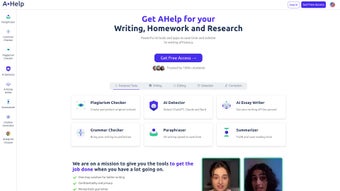
- AI Essay Writer – Generate well‑structured essays, research papers, or reports from a brief prompt. The tool follows academic conventions, includes logical headings, and can tailor tone and complexity to match undergraduate, graduate, or professional standards.
- Plagiarism Checker – Scan your document against billions of web pages, academic journals, and student papers. The checker highlights matched text, provides similarity percentages, and offers suggestions for proper paraphrasing.
- AI Text Detector – Identify whether a passage was likely produced by an AI model. This is invaluable for educators and editors who need to verify authenticity.
- Grammar & Style Checker – Go beyond simple spell‑check. AHelp corrects subject‑verb agreement, punctuation, passive‑voice usage, and even suggests style improvements aligned with APA, MLA, or Chicago guidelines.
- Paraphraser – Re‑write sentences or entire paragraphs while preserving meaning. The paraphraser offers multiple rewrite options, helping you avoid accidental plagiarism and refresh repetitive language.
- Summarizer – Feed in a long article, research paper, or book chapter, and receive a concise summary that captures key arguments, findings, and conclusions in just a few paragraphs.
- Citation Generator – Automatically create citations in dozens of formats (APA, MLA, Harvard, Vancouver, etc.). Paste a URL, DOI, or ISBN and AHelp produces a correctly formatted reference list.
- AI‑Powered Research Assistant – Suggest relevant keywords, related literature, and even draft a quick literature review outline based on your topic.
- Secure Cloud Storage – Save drafts directly in AHelp’s encrypted workspace, allowing you to access and edit documents from any device without worrying about data breaches.
- Continuous Updates – Subscription includes regular model upgrades, new citation styles, and expanded language support, ensuring the tool stays current with academic standards.
Each feature is integrated into a single dashboard, meaning you can move seamlessly from drafting an outline with the AI Essay Writer to checking originality, polishing language, and generating a bibliography—all without leaving the platform. This workflow cohesion is what makes AHelp a true “writing companion” rather than a collection of disjointed utilities.
Installation, Usage & Compatibility – Getting Started with AHelp
How to Install
Because AHelp is a cloud‑based service, there is no traditional software download or installation process. Getting started is as simple as visiting ahelp.io, creating an account, and selecting a subscription tier that fits your needs. After registration, you will receive a confirmation email with a secure link to your personal dashboard. The platform is optimized for modern browsers such as Chrome, Firefox, Edge, and Safari, and it automatically detects the best display settings for your device.
Step‑by‑Step Usage Guide
- Sign Up & Log In – Use your school or corporate email for quick verification. Two‑factor authentication is optional but recommended for added security.
- Select a Tool – From the left‑hand navigation pane, choose the desired utility (e.g., “Essay Writer” or “Citation Generator”).
- Enter Your Prompt – Provide a brief description, topic, or keywords. For the Essay Writer, you can also specify word count, required sections, and preferred citation style.
- Review AI Output – The generated content appears in an editable window. Use the built‑in “Highlight Issues” button to run the Grammar Checker and Plagiarism Checker simultaneously.
- Refine & Export – Apply suggested edits, run the Paraphraser if needed, and finally click “Export” to download as .docx, .pdf, or copy directly to Google Docs.
- Save to Cloud – Click “Save to Workspace” to keep a versioned copy in AHelp’s secure cloud for future reference.
Operating System Compatibility
Since AHelp runs entirely in the browser, it is compatible with virtually any operating system that supports a modern web browser. This includes:
- Windows 10/11
- macOS Catalina and later
- Linux distributions (Ubuntu, Fedora, etc.)
- iOS 13+ (Safari or Chrome) – for tablets and iPhones
- Android 9+ (Chrome or Firefox)
The responsive design ensures that the interface adapts to both desktop monitors and mobile screens, making it easy to draft a paragraph on a commuter train or polish a final report from a coffee shop.
Pros & Cons – A Balanced Look
- Pros
- All‑in‑one platform eliminates the need for multiple subscriptions.
- AI models are regularly updated, keeping the tool ahead of competitors.
- Secure cloud storage complies with GDPR and FERPA standards.
- Multi‑language support (English, Spanish, French, German, and more).
- Intuitive UI suitable for beginners and advanced users alike.
- Cons
- Requires a stable internet connection; offline mode is not available.
- Subscription cost may be higher than single‑purpose free tools.
- AI-generated content still benefits from human review for nuanced arguments.
Overall Rating: 4.5/5 – AHelp delivers a robust set of features that streamline academic writing, though the reliance on continuous internet access is a minor drawback for users in low‑bandwidth regions.
Frequently Asked Questions
Is AHelp safe for storing confidential research data?
Yes. AHelp employs end‑to‑end encryption for all documents stored in its cloud workspace. The platform complies with GDPR, FERPA, and ISO‑27001 standards, ensuring that personal and research data remain private and protected from unauthorized access.
Can I use AHelp on a Chromebook?
Absolutely. Since AHelp runs in any modern browser, Chromebooks with Chrome OS are fully supported. The responsive design works perfectly on the smaller screen, and all features—including the citation generator and plagiarism checker—function without any loss of capability.
How does the AI Text Detector differentiate between human and AI‑written content?
The detector analyses linguistic patterns, sentence structure, and statistical markers that are characteristic of large language models. It then assigns a confidence score indicating the likelihood of AI authorship, helping educators and editors make informed decisions.
What citation styles does the generator support?
AHelp supports over 20 citation formats, including APA 7th, MLA 9th, Chicago (Notes‑Bibliography and Author‑Date), Harvard, Vancouver, IEEE, and many discipline‑specific styles. Users can also create custom citation templates if needed.
Is there a free trial available?
Yes. AHelp offers a 7‑day free trial with full access to all features. No credit card is required to start the trial, and users can cancel at any time before the subscription begins.
Conclusion & Call to Action
In a world where academic integrity and efficiency are paramount, AHelp stands out as a versatile, secure, and constantly evolving AI writing assistant. Its comprehensive toolbox—ranging from essay generation to citation management—covers every step of the writing journey, making it an indispensable partner for students, researchers, and professionals alike. While a reliable internet connection is a prerequisite, the value delivered through time savings, improved writing quality, and peace of mind regarding plagiarism far outweighs this minor limitation. If you’re ready to elevate your research and writing workflow, sign up for AHelp today and experience the future of academic assistance firsthand.



.png)



